
October 2026 Pledgemine Updates
This month, we have one product update to share for Pledgemine: Timeline Tracking, Now in Your Portal
https://www.loom.com/share/b4847ca90a354d099c0c1a661273bb4f
What's New?
Up until now, checking on a project's timeline meant emailing your Project Coordinator and waiting to hear back. Now, you can see it live in your Pledgemine portal instead.
Log in and go to the Timelines page to see every active project, grouped by the month and year its approval date falls in. Each timeline shows the project name, solution code, piece count, and mail class.
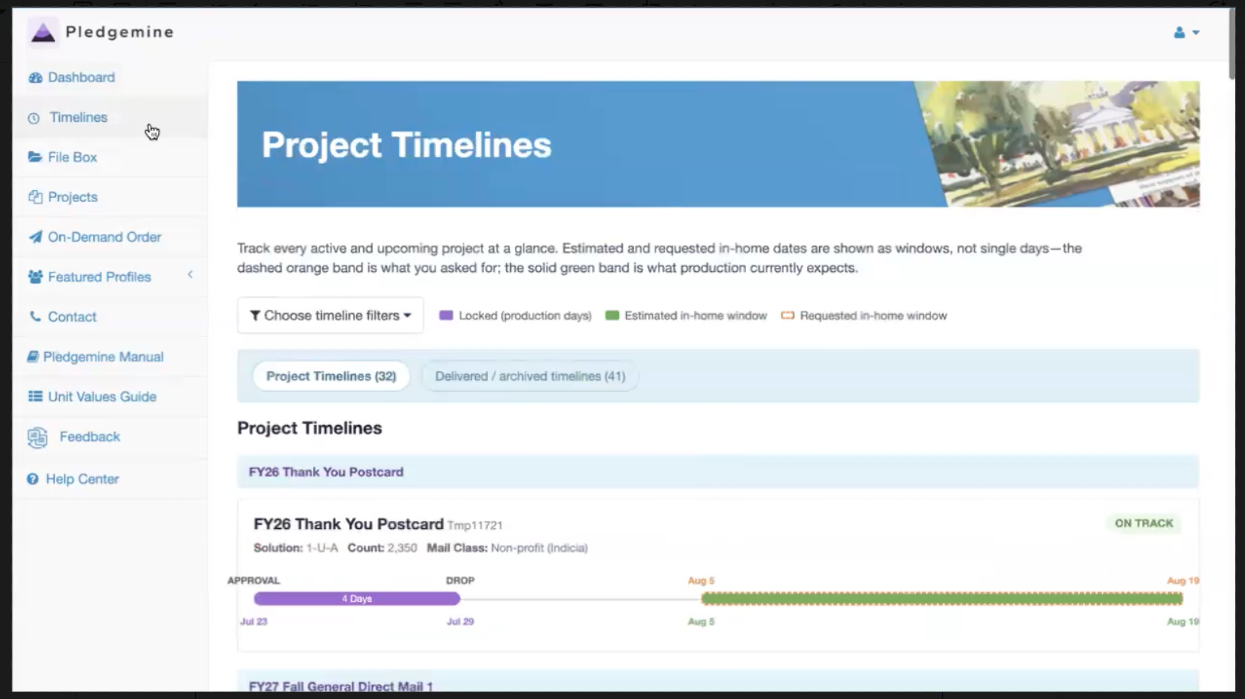
Every timeline also carries a status tag, so you can see where things stand at a glance:
Not Started: Design work hasn't begun yet.
On Track: 6 or more business days remain before the approval date.
At Risk — 5 or fewer business days remain before the approval date
Off Track: The approval date has passed.
In Production: Approved and now being produced.
Completed: Mailed and done.
Cancelled: The project was cancelled and won't be mailed.
Expired: Planned for projects that go a long time without activity — the exact criteria are still being finalized, so we'll share details once they're confirmed.
Hovering over any date on the page shows more detail, and your existing projects are already loaded, so there's nothing you need to do to start using it.
Key Benefits
This update gives you the same visibility your Project Coordinator has always had, right in your own portal:
Real-Time Visibility: Check where a project stands anytime, without waiting on an email reply.
Fewer Status Check-Ins: See it yourself instead of pinging your Project Coordinator for an update.
Know When to Act: A clear status tag flags at a glance whether a project is on track, at risk, or needs your attention.
Organized by Approval Date: Projects are grouped by the month their approval date falls in, so it's easy to see what's coming up.
A quick note on Off Track and Expired: production time doesn't shrink to make up for lost time, so if a project goes off track, your Project Coordinator will reach out to work out a new approval date with you. If a timeline expires, just reach out to your Project Coordinator to pick it back up. By default, the page only shows your active timelines — you can switch over to see everything that's already completed, cancelled, or expired.
Questions?
Please reach out to pledgemine.support@evertrue.com or your assigned Project Coordinator for more information.
Reply
Content aside
- 6 hrs agoLast active
- 4Views
-
1
Following